Introduction
Managing your retirement savings in India has undergone a massive digital transformation, turning the once-tedious process of tracking employee provident fund balances into a smooth digital experience. At the center of this ecosystem sits the epfo member portal, the primary gateway used by millions of salaried individuals across India to monitor their provident fund accounts, update profiles, and settle claims. However, keeping a portal running efficiently for a workforce of tens of millions requires periodic overhauls.
- Introduction
- What is the EPFO Member Portal?
- Current Situation and Latest Portal Updates
- Why is This System Upgrade Important?
- Key Highlights of the Revamped EPFO System
- Detailed Explanation of Key Portal Features
- Technical Specifications and Requirements for Users
- Security, Privacy, and System Reliability
- Step-by-Step Guide: Navigating the New UAN Activation Flow
- Advantages and Disadvantages of the New Portal Framework
- Future Expectations and Continuous Digital Roadmap
- Frequently Asked Questions (FAQs)
- Conclusion
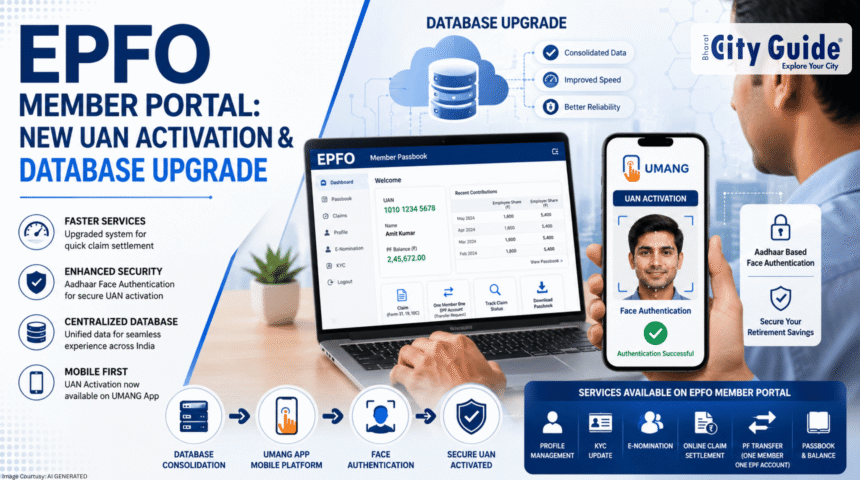
Recently, users attempting to access their accounts encountered temporary outages and system lag. These glitches were part of a deliberate and massive system upgrade undertaken by the Employees’ Provident Fund Organisation (EPFO). The regulatory body has completed a major database consolidation and software upgrade designed to modernize its underlying systems, streamline data processing, and boost transaction security.
With the upgrade complete, the central retirement body has successfully restored most of its online member and employer services. While this restoration brings immense relief to salaried professionals and HR departments across the country, the system has not simply gone back to the old way of working. The software migration introduces functional changes that modify how users interact with the system.
Crucially, while the core portal remains the hub for tracking balances and managing nominee profiles, two critical Universal Account Number (UAN) functions have been completely migrated off the platform. Understanding these structural changes is essential for every corporate worker and employer in India to avoid operational delays. This guide breaks down what works on the portal, what has moved, and how you can seamlessly navigate the updated digital interface.
What is the EPFO Member Portal?
The epfo member portal, officially known as the Member Sewa Portal, is an interactive web platform established by the Employees’ Provident Fund Organisation under the Ministry of Labour and Employment, Government of India. It functions as the comprehensive digital touchpoint for any employee contributing to the Employees’ Provident Fund (EPF) scheme. Instead of submitting physical applications through corporate employers or visiting regional labor offices, members use this portal to manage their retirement funds self-sufficiently.
Historically, the management of provident funds in India was heavily reliant on manual ledger books, physical application forms, and long processing cycles. The introduction of the Universal Account Number (UAN) in 2014 served as a watershed moment for the organization. The UAN acts as a permanent, umbrella identifier for an individual throughout their working life, irrespective of how many times they switch jobs. The online portal was built directly on top of this UAN framework to give employees an accessible, real-time dashboard of their financial holdings.
The structural importance of the portal cannot be overstated. It gives salaried individuals absolute transparency over their monthly salary deductions, allowing them to verify that their employers are genuinely depositing collected funds into the government treasury. For a worker, the platform acts as a secure savings repository, a tool for financial planning, and an emergency fund manager during periods of job transition or medical crises.
Current Situation and Latest Portal Updates
The organization has formally announced the successful conclusion of a comprehensive database consolidation project. Over the past few months, the IT infrastructure of the organization was heavily reworked to merge disparate regional databases into a centralized system. This technical overhaul aimed to eliminate data duplication, fix mismatched identity entries, and accelerate the processing speeds of online claims, which had previously suffered from regional server bottlenecks.
Following this upgrade, the majority of online services on the epfo member portal are fully operational. Users can log in using their credentials to view passbooks, initiate transfers, and execute routine profile updates. The portal’s user interface has also been stabilized to handle peak daily traffic loads far better than the previous iteration.
However, the most significant policy update is the strategic relocation of specific services. The organization has officially moved two crucial entry-level operations away from the desktop portal interface:
- Online UAN Activation
- Direct UAN Allotment
These two essential services have been completely removed from the desktop portal. Instead, they have been integrated into the mobile-focused UMANG (Unified Mobile Application for New-age Governance) platform. Furthermore, the authentication mechanism for these services has been heightened. Users can no longer activate their UAN using basic text-based One-Time Passwords (OTPs). Instead, they must complete the process via Aadhaar-based Face Authentication (FAT), marking a substantial shift toward biometric-first security protocols in managing national pension assets.
Why is This System Upgrade Important?
This architectural shift carries significant weight for both everyday consumers and the broader Indian fintech landscape. For individual consumers, the database consolidation drastically lowers the chances of technical claims bouncing due to structural errors. In the past, slight differences in data formatting across regional offices could stall an employee’s money transfer for months. A unified database structure creates a standardized validation loop, paving the way for automated, script-free claim approvals.
From an industry standpoint, the upgrade significantly cuts down the administrative burden placed on corporate Human Resource departments. HR professionals previously spent considerable time troubleshooting UAN activation errors and handling compliance issues caused by regional server mismatches. Moving entry-level registration over to a mobile biometric platform reduces identity fraud and cuts down on corporate paperwork.
Furthermore, integrating Aadhaar-based Face Authentication sets a new benchmark for financial security within public sector platforms. As digital scams and identity theft grow more sophisticated, text-based OTPs are increasingly vulnerable to sim-swapping and phishing attacks. Transitioning to facial biometrics ensures that the person initiating a UAN activation is the genuine citizen assigned to that identity card, safeguarding hard-earned retirement savings from unauthorized access.
Key Highlights of the Revamped EPFO System
- Restored Portal Ecosystem: Core modules including balance checking, profile configuration, and passbook access are back online with enhanced processing speeds.
- Decentralized UAN Activation: Desktop-based activation has been deprecated, transferring the entire onboarding workflow to mobile systems.
- Biometric Identity Verification: Mandatory integration of Face Authentication (FAT) via mobile cameras for critical account setups.
- Simplified Nominee Management: Accelerated digital signature tools for e-Sign confirmations, allowing seamless nominee updates.
- Expedited Death Claim Management: Relatives and legal nominees can file digital claims directly on the portal during emergencies, skipping regional office lines.
- Centralized Database Framework: Merged regional servers create unified historical logs of worker histories across different states.
Detailed Explanation of Key Portal Features
To effectively manage your retirement savings, it helps to understand the main options still available inside the updated system layout.
Know Your UAN and Account Tracking
The “Know Your UAN” feature remains accessible on the web interface. This service allows employees who do not know their assigned identification number to retrieve it by entering their registered mobile number, member ID, or PAN details. Once validated, the system displays the associated number. This tool helps workers verify that their corporate onboarding team has correctly registered them within the national database.
Profile and Direct Documentation Management
Inside the main dashboard, members retain complete control over their personal data records. This feature enables individuals to upload valid Know Your Customer (KYC) paperwork, modify misspelled names, adjust birth dates, and link valid bank accounts. Keeping these records accurate ensures that when you eventually apply for an online withdrawal, the portal’s automated scripts can instantly match your bank details without triggering human review flags.
Online Claim Settlement and Transfer Routing
This module enables workers to file electronic withdrawal requests—such as partial advances for medical emergencies, house construction, or education—alongside final settlements. When shifting jobs, employees use this feature to route accrued funds from their previous company’s account into their current one. The consolidated backend significantly reduces the time it takes to move these funds between accounts.
Digital Nomination Filings
The e-Nomination feature allows members to officially record their beneficiaries using electronic signatures. By linking the account with family details and assigning specific fund shares, users secure their family’s financial future. This step is mandatory; without an active e-nomination on file, the system restricts members from accessing their detailed online passbooks.
Technical Specifications and Requirements for Users
Navigating the updated framework requires matching specific system parameters. The table below lists the baseline hardware, software, and document criteria needed to access services smoothly across both the web portal and mobile app:
| Component / Requirement | Web Member Portal Specification | UMANG App Mobile Specification |
| Supported Browsers | Google Chrome, Mozilla Firefox, Microsoft Edge (Latest Versions) | Not Applicable (Native App Interface) |
| Operating System | Windows 10/11, macOS, Linux distributions | Android version 6.0 and above / iOS 11.0 and above |
| Primary Identity Tool | Verified Linkage to Personal Profile | Mandatory for Face Authentication workflows |
| Biometric Capture Tool | Not Applicable (Desktop Services) | Front-facing mobile camera with minimum 5MP resolution |
| Auxiliary Software | Adobe Acrobat Reader (for downloaded claim forms) | Aadhaar FaceRD Mobile App (Downloaded from Google Play Store) |
| Network Minimum | Stable broadband connection (Minimum 2 Mbps download) | Active 4G LTE or 5G mobile data connection |
Security, Privacy, and System Reliability
Given the massive amount of national capital managed by the organization, security is a top priority for this upgrade. Transitioning to Aadhaar-based Face Authentication addresses a critical vulnerability in digital finance: credential sharing and phishing. By utilizing the Unique Identification Authority of India’s (UIDAI) FaceRD architecture, the mobile app captures a live 3D map of the user’s facial structure. The software checks this live scan against the image saved in the central national registry, ensuring the actual account owner is present.
On the desktop end, the epfo member portal uses updated Secure Sockets Layer (SSL) certificates to encrypt communication between your web browser and the central database servers. This encryption blocks malicious actors from intercepting session cookies or reading personal identity numbers over public Wi-Fi networks. Furthermore, regular automated system logs record every login attempt, bank account modification, and transfer request, providing a clear audit trail to protect against interior fraud.
Step-by-Step Guide: Navigating the New UAN Activation Flow
Because the desktop portal no longer handles initial setups, users must adapt to the new mobile-first workflow. Follow this step-by-step sequence to register and activate a UAN using a mobile device:
1.Download Required Mobile Applications:Prerequisite Setup.
Open your smartphone’s application store (Google Play Store for Android or Apple App Store for iOS). Download and install the official UMANG App. Additionally, you must download the Aadhaar FaceRD (Early Access) App developed by UIDAI, which acts as the background engine for facial scanning.
2.Locate EPFO Services within UMANG:In-App Navigation.
Launch the UMANG application and complete the basic mobile verification to enter the home dashboard. Use the central search bar at the top of the app to type in EPFO. Select the official service card to open the specialized departmental menu.
3.Select UAN Activation Service:Service Initiation.
Scroll through the list of available member utilities and click on the link labeled UAN Activation. The application will open a data entry screen requiring your identification credentials.
4.Input Personal Identity Details:Data Validation.
Carefully enter your 12-digit Universal Account Number (UAN), your full legal name as printed on government documents, your date of birth, and your registered mobile phone number. Confirm the verification box and click proceed.
5.Execute Aadhaar Face Authentication:Biometric Scanning.
The application will automatically call the background FaceRD software and turn on your front-facing camera. Hold your mobile device steady at eye level in a well-lit room. Blink your eyes when prompted by the on-screen guide to confirm a live user is present.
6.Receive Final Password Credentials:Account Access.
Once the facial database confirms a match, your identity verification is complete. The system will send a secure auto-generated password to your registered mobile phone number via SMS. You can now use this password to log into the desktop portal.
Advantages and Disadvantages of the New Portal Framework
Advantages
- Reduced Identity Fraud: Using facial biometrics makes it much harder for malicious actors to illegally hijack accounts using stolen text messages or leaked passwords.
- Faster System Approvals: Consolidating regional server branches into a centralized hub eliminates regional data lag, helping online claims process much quicker.
- Independent Mobile Activation: New employees no longer need a desktop computer to activate their accounts; they can complete the entire process from a smartphone.
- Lower Desktop Traffic Jam: Moving entry-level UAN activations over to mobile systems relieves pressure on the main desktop web servers, making the desktop portal more stable for handling complex claim filings.
Disadvantages
- Technological Entry Barriers: Individuals using older smartphones lacking high-quality front cameras or up-to-date operating systems may encounter errors while running the facial verification software.
- App Store Dependencies: Forcing users to download two distinct applications to activate an account adds extra steps that can confuse less tech-savvy workers.
- Initial Learning Curves: Rural workforces accustomed to simple text-message verifications may face initial difficulties adjusting to biometric scan rules.
Future Expectations and Continuous Digital Roadmap
The completion of this database consolidation marks the first phase of a broader multi-year modernization strategy. Internal policy briefs suggest that the organization plans to leverage this unified backend to roll out an entirely automated, algorithmic claim engine. The long-term goal is to achieve “Next-Day Settlements” for standard medical advances and job-switch transfers, entirely bypassing the manual verification queues that traditionally bottleneck regional offices.
Additionally, we can expect deeper integration with the national DigiLocker repository. This link will allow users to instantly verify supporting claim paperwork, such as scanned bank checks or employment termination letters, through pre-verified government digital folders. By continuously reducing dependency on paper files, the organization is steadily moving toward an ecosystem where managing retirement assets is as fast and straightforward as modern digital banking.
Frequently Asked Questions (FAQs)
Can I still activate my UAN using the desktop version of the EPFO member portal?
No, you can no longer complete your initial UAN activation through the desktop web interface. Following the recent software upgrade and database consolidation, the organization removed both UAN Activation and Direct UAN Allotment from the desktop portal layout. To activate your account, you must download the official UMANG application on a mobile device and complete the registration process using Aadhaar-based Face Authentication. The desktop site is now reserved for managing your profile, filing e-nominations, and submitting online claims after your account is active.
What should I do if the facial scanning step fails on the mobile app?
If your facial authentication fails, ensure you are standing in a well-lit room with clear light falling on your face, avoiding harsh shadows or dark backgrounds. Hold your mobile device steady at eye level and remove any accessories like caps, sunglasses, or large medical masks. You must also verify that you have downloaded the background Aadhaar FaceRD application from the app store, as this runs the scanning engine. If errors continue, verify that your name and birth date match your ID records exactly, as data mismatches can cause the system to reject a facial scan.
Why was my e-nomination wiped out after this recent system consolidation?
For most users, active e-nominations remain securely saved within the updated database structure. However, if your previous nomination contained formatting errors, mismatched identity details, or incomplete digital signatures, the consolidated system may flag the entry as unverified to protect your account security. Log into your dashboard to check your status. If your previous records are missing, simply click the e-Nomination option under the Manage tab to submit a fresh digital signature and update your family details.
Can I change my registered bank account details on the mobile app?
While you can review your active profile information within the mobile app, completing complex data changes—like updating your bank account numbers or switching your branch IFSC codes—is best done through the desktop web dashboard. To update your banking info, log into the web portal, navigate to the Manage tab, and select KYC. Enter your new bank details and sign the request. This update will automatically route to your employer for final digital approval before saving into the system.
How does the database upgrade speed up my partial withdrawal requests?
Previously, the organization stored data across various regional servers, meaning an online claim filed in one city often required slow verification check-ins with databases in another state. Consolidating these separate systems into a single centralized database allows automated scripts to instantly verify your employment history, identity details, and total balances. This structural shift cuts out regional data lag, helping standard advance claims process much faster than under the old system.
Is it safe to share my live biometric facial data during this mobile validation process?
Yes, this mobile authentication process is highly secure. The facial verification engine does not save or copy your image on your phone or within the app’s servers. Instead, it uses an encrypted channel via the secure national FaceRD system to match your live camera feed directly against your official identity records. This setup provides a much safer alternative to traditional text-message passwords, shielding your long-term retirement assets from remote phishing attacks and identity theft.
Conclusion
The successful software migration and database overhaul of the epfo member portal represent a significant milestone in India’s public sector financial infrastructure. While adjusting to the removal of desktop UAN activations and the shift to mobile facial scanning might take some time, the long-term benefits are substantial. These updates deliver noticeably faster claims processing, stronger defense against identity fraud, and a far more stable online experience for workers across the nation.
As these digital systems settle into their new workflows, keeping your account details accurate is your best defense against processing delays. Members should download the required mobile applications, complete their facial verifications, and ensure their e-nominations are fully up to date. Embracing these high-security digital tools gives you smooth, reliable control over your provident fund assets, keeping your retirement runway clear and well-protected.